Automation V3: Allowlist Provar in Google Workspace for Gmail Connections
This article covers the Google Workspace admin configuration required before users can add a Gmail connection in Provar Automation using Web-based Authentication. It also explains how to resolve the “Access blocked” (Error 403: access_denied) message that appears when this configuration is missing.

Prerequisites
- You are signed in at admin.google.com as a Super Admin (or an admin with the Security and App access control privileges).
- You have Provar’s OAuth Client ID:
402965450570-1gdkvke38ucl1t21nj6f2gn82l9hcn08.apps.googleusercontent.com
Allowlist Provar and Mark It as Trusted

402965450570-1gdkvke38ucl1t21nj6f2gn82l9hcn08.apps.googleusercontent.comStep 1: In the Admin Console, go to Security → Access and data control → API controls.
Step 2: Under App access control, click Manage Third-Party App Access.
Step 3: Click Add app → OAuth App Name Or Client ID.
Step 4: In the search box, paste Provar’s Client ID (402965450570-1gdkvke38ucl1t21nj6f2gn82l9hcn08.apps.googleusercontent.com) and click Search.
Note: Searching by Client ID is the precise method. It returns the exact app rather than name matches.
Step 5: Select the check box next to the returned Provar app, then click Select.
Step 6: Confirm the OAuth Client ID shown matches the one above, then click Select again.
Step 7: Choose the scope of the configuration. Select the organisational unit or group that contains the users who will run Provar, or apply the configuration to the whole organisation, then click Continue.
Step 8: On the access screen, set the app access to Trusted (“Can access all Google services”).
Note: Choosing “Limited” only grants a subset of services and may not include the https://mail.google.com/ scope Provar needs. Trusted is the correct choice here.
Step 9: Click Configure (or Continue → Finish) to save.
After Saving
Changes can take up to 24 hours to fully propagate, although they are often much faster.
Once propagated, users in the selected organisational unit or group can launch the Google connection authorisation in Provar Automation, complete the normal browser sign-in and consent once, and Provar stores the access and refresh tokens. No App Password is involved.
For the steps to add the Gmail connection in Provar Automation, see Automation V3: Email Testing in Automation.
Verification
- In the Admin Console, the Provar app appears in the Third-party app access list with the status Trusted.
- In Provar Automation, clicking Authorise … on the connection completes the browser sign-in without the Error 403 message, and the Access Token, Refresh Token, and Expires fields populate.
Troubleshooting: Error 403: access_denied
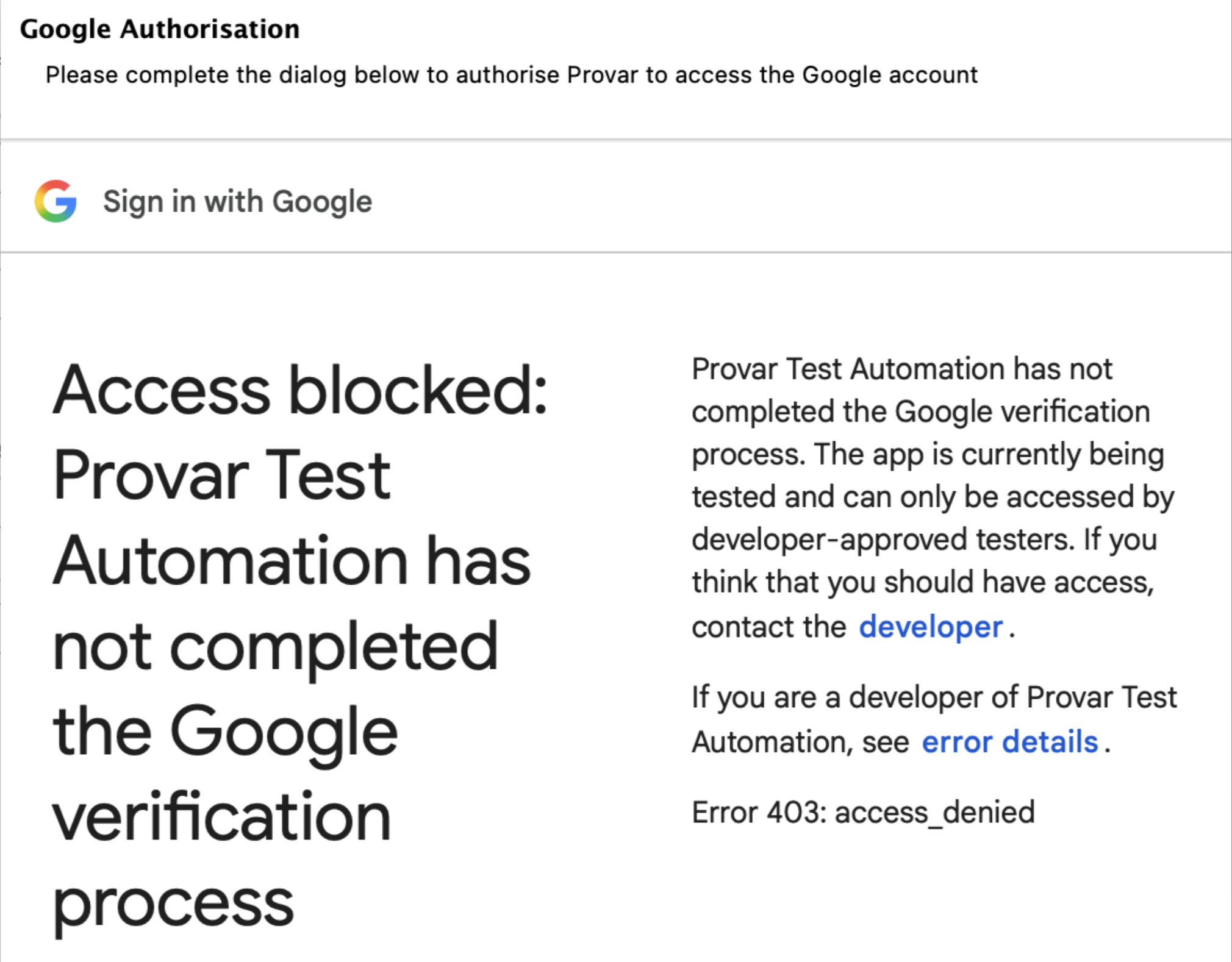
When you click Authorise … on a Google Applications connection and sign in with your Google account, the browser may show the following message instead of the consent screen:
“Access blocked: Provar Test Automation has not completed the Google verification process. The app is currently being tested and can only be accessed by developer-approved testers. Error 403: access_denied”

Above: The Error 403: access_denied message shown during Google authorisation.
This means the Google account belongs to a Google Workspace organisation that has not allowlisted Provar as a trusted third-party app. Google blocks the OAuth sign-in until a Workspace admin completes the steps in the “Allowlist Provar and Mark It as Trusted” section above. The error can also appear if the configuration was saved recently and has not finished propagating.
If the error persists after propagation, confirm the user’s account is within the organisational unit or group selected in Step 7.
Related Articles
- Automation V3: Email Testing in Automation
- Automation V3: Gmail Connection in Automation with App Password
- Troubleshooting Gmail Connection
- Automation V3: Add Gmail Firewall Exception
- Home
- Provar MCP
- Get Started with V3
- System Requirements
- Automation V3: Skip Welcome Screen on Launch
- Browser and Driver Recommendations
- Installing Provar Automation V3
- Updating Provar Automation V3
- Licensing Provar Automation V3
- Automation V3: Granting Org Permissions to Provar Automation
- Automation V3: Optimizing Org and Connection Metadata Processing in Provar
- V3 Connections
- AI with Provar Automation V3
- AI Self-Healing (Beta)
- Closing the AI Quality Gap with Provar
- FAQ: Provar AI Capabilities
- Automation V3: Understanding Provar’s Use of AI Service for Test Automation
- Automation V3: Enable or Disable AI Features in Provar
- Automation V3: Provar Assistant
- Automation V3: Image Validator
- Automation V3: Intent Validator
- Automation V3: Test Data Generation
- Automation V3: AI Test Step Generation
- Automation V3: Utterance Generator
- Automation V3: Simplified Agentforce Agent API Testing
- Using Provar Automation V3
- Automation V3: Content Synchronization
- Automation V3: Feature-by-Feature Guide
- Automation V3: Provar Automation
- Automation V3: Creating a New Test Project
- Automation V3: Import Test Project from a File
- Automation V3: Import Test Project from a Remote Repository
- Automation V3: Import Test Project from Local Repository
- Automation V3: Commit a Local Test Project to Source Control
- Automation V3: Salesforce API Testing
- Automation V3: Behavior-Driven Development
- Automation V3: Consolidating Multiple Test Execution Reports
- Automation V3: Creating Test Cases
- Custom Table Mapping in V3
- Functions in V3
- Automation V3: Using Functions
- Automation V3: Count
- Automation V3: DateAdd
- Automation V3: DateFormat
- Automation V3: DateParse
- Automation V3: GetEnvironmentVariable
- Automation V3: GetSelectedEnvironment
- Automation V3: IsSorted
- Automation V3: Not
- Automation V3: NumberFormat
- Automation V3: Round
- Automation V3: StringNormalize
- Automation V3: StringReplace
- Automation V3: StringTrim
- Automation V3: TestCaseErrors
- Automation V3: TestCaseName
- Automation V3: TestCaseOutCome
- Automation V3: TestCasePath
- Automation V3: TestCaseSuccessful
- Automation V3: TestRunErrors
- Automation V3: UniqueId
- Automation V3: Debugging Tests
- Automation V3: Creating Custom Test Steps
- Automation V3: Defining Proxy Settings
- Automation V3: Environment Management
- Automation V3: Exporting Test Projects
- Automation V3: Japanese Language Support
- Automation V3: Customize Browser Driver Location
- Automation V3: Managing Test Steps
- CBMT in V3
- Automation V3: Provar Test Builder
- ProvarDX in V3
- Automation V3: Refresh and Recompile
- Automation V3: Reintroduction of CLI license Check
- Automation V3: Reload Org Cache
- Automation V3: Reporting
- Automation V3: Running Tests
- Automation V3: Searching Provar with Find Usages
- Automation V3: Secrets Management and Encryption
- Automation V3: Setup and Teardown Test Cases
- Automation V3: Tags and Service Level Agreements (SLAs)
- Test Cycles in V3
- Automation V3: Test Plans
- Automation V3: Testing Browser – Chrome Headless
- Automation V3: Testing Browser Options
- Automation V3: Tooltip Testing
- Using Custom APIs in V3
- Callable Tests in V3
- Data-Driven Testing in V3
- Page Objects in V3
- Automation V3: Introduction to XPaths
- Automation V3: Creating an XPath
- Automation V3: JavaScript Locator Support
- Automation V3: Maintaining Page Objects
- Automation V3: Refactoring Page Objects
- Automation V3: Mapping Non-Salesforce Fields
- Automation V3: ProvarX™
- Automation V3: Refresh and Reselect Field Locators in Test Builder
- Automation V3: Create different page objects for different pages
- Applications Testing in V3
- Automation V3: Database Connections
- Automation V3: PDF Testing
- Automation V3: Email Testing in Automation
- Automation V3: Email Testing Examples
- Automation V3: Gmail Connection in Automation with App Password
- Automation V3: App Configuration for Microsoft Connection in MS Portal for OAuth 2.0
- Automation V3: OAuth 2.0 Microsoft Exchange Email Connection
- Automation V3: Support for Existing MS OAuth Email Connection
- Automation V3: OAuth 2.0 MS Graph Email Connection
- Automation V3: Create a Connection for Office 365 GCC High
- Automation V3: Mobile Emulation (Salesforce Mobile)
- Automation V3: Using Provar with Amazon Web Services (AWS) Device Farm
- Automation V3: Web Services
- Provar for Microsoft Dynamics 365: Supported Capabilities
- Automation V3: Integrating with Jira
- Automation V3: Provar Feature Flags and Properties Configuration
- Automation V3: Using Java Method Annotations for Custom Objects
- Automation V3: Test Palette Introduction
- Automation V3: Apex Bulk
- Automation V3: Apex Execute
- Automation V3: Assert Test Step
- Automation V3: Assert Salesforce Layout
- Automation V3: Break Test Step
- Automation V3: Extract Salesforce Layout
- Automation V3: Fail Test Step
- Automation V3: Finally Test Step
- Automation V3: For Each Test Step
- Automation V3: Generate Test Case
- Automation V3: Group Steps Test Step
- Automation V3: If Test Step
- Automation V3: List Compare
- Automation V3: Page Object Cleaner
- Automation V3: Read Test Step
- Automation V3: Set Values Test Step
- Automation V3: Sleep Test Step
- Automation V3: String Test Steps
- Automation V3: Switch Test Step
- Automation V3: UI Action
- Automation V3: UI Assert
- Automation V3: UI Connect
- Automation V3: UI Fill
- Automation V3: UI Handle Alert
- Automation V3: UI Navigate
- Automation V3: UI On Screen
- Automation V3: UI With Row
- Automation V3: Wait For Test Step
- Automation V3: While Test Step
- Automation V3: Override Auto-Retry for Test Step
- Automation V3: Using Encrypted Password Variables in Expression Editors
- DevOps with V3
- Automation V3: Introduction to Provar DevOps
- Automation V3: Introduction to Test Scheduling
- Automation V3: Setting Java Development Kit (JDK) Environment Variables
- Automation V3: Configuration on Jenkins
- Automation V3: Version Control and DevOps
- Automation V3: Setting up Continuous Integration
- Automation V3: Execution Environment Security Configuration
- Automation V3: Bitbucket Pipelines
- Automation V3: Perfecto Mobile
- Automation V3: ANT Task Parameters
- Automation V3: Provar Jenkins Plugin
- Automation V3: Running Automation Tests on Jenkins
- Automation V3: Configuring the Automation Secrets Password in Microsoft Azure Pipelines
- Automation V3: Parallel Execution in Microsoft Azure Pipelines using Test Plans
- Automation V3: Parallel Execution in Microsoft Azure Pipelines using Targets
- Automation V3: Parallel Execution in Microsoft Azure Pipelines using Multiple build.xml Files
- Automation V3: Parallel Execution in GitHub Actions using Test Plan
- Automation V3: Running Provar on Linux
- Automation V3: CircleCI Orbs
- Automation V3: CircleCI Common Build Errors
- Automation V3: CircleCI via Docker
- Automation V3: Copado Integration Introduction
- Automation V3: Copado Configuration
- Automation V3: Copado Architecture Overview
- Automation V3: Docker Runner
- Automation V3: Running Provar Tests on Docker using Docker File
- Automation V3: Docker Continuous Integration
- Automation V3: Setting up Continuous Integration with Jenkins for Docker
- Automation V3: Generating the build.xml File for Docker
- Automation V3: Flosum Configuration
- Automation V3: Flosum Integration Introduction
- Automation V3: Flosum Architecture Overview
- Automation V3: Parallel Execution in GitHub Actions using Multiple build.xml Files
- Automation V3: Parallel Execution in GitHub Actions using Targets
- Automation V3: Remote Trigger in GitHub Actions
- Automation V3: Parallel Execution in GitHub Actions using Job Matrix
- Automation V3: Gearset DevOps CI/CD via Jenkins
- Automation V3: GitLab Continuous Integration
- Automation V3: GitHub Desktop – Creating a Git Repository for Automation Projects
- Automation V3: Integrating GitHub Actions CI to Run Automation CI Task
- Automation V3: Provar Test Results Package
- Automation V3: Running a Provar CI Task in Azure DevOps Pipelines
- Automation V3: Amazon Web Service (AWS) & Jenkins Configuration
- Automation V3: ANT: Generating ANT Build File
- Automation V3: ANT Licensing
- Automation V3: Reading Data from Excel
- Automation V3: Configuration on other CI tools
- Automation V3: Setting Apache Ant Environment Variables
- Automation V3: BrowserStack Desktop
- Automation V3: Integrating with LambdaTest
- Automation V3: Sauce Labs Desktop
- Automation V3: AutoRABIT Salesforce DevOps in Provar Test
- Automation V3: Selenium Grid
- Automation V3: Working with Git
- Automation V3: Configuration for Sending Emails via the Automation Command Line Interface
- Automation V3: Parameterization using Environment Variables in GitHub Actions
- Automation V3: Slack Integration with Automation
- Automation V3: Zephyr Cloud and Server
- Automation V3: Adding a Salesforce Communities Connection
- Automation V3: Integrating with Sauce Labs Real Device
- Automation V3: Travis CI
- Automation V3: Salesforce DX Integration
- Automation V3: Variable Set Syntax
- Automation V3: Visualforce Testing
- Automation V3: List and Table Testing
- Automation V3: Salesforce Lightning Web Component (LWC) Locator Support
- Automation V3: Salesforce Console Testing
- Recommended Practices with V3
- Salesforce MFA Enforcement: Guidelines for Provar Users
- Automation V3: Provar Naming Standards
- Automation V3: Object Mapping Between Provar Automation and Quality Hub
- Salesforce API Access Control Security Update – Impact on Provar Connections
- Automation V3: Salesforce Connection Best Practices
- Automation V3: Automation Planning
- Automation V3: Supported Testing Phases
- Automation V3: Best practices for the .provarCaches folder
- Automation V3: Best practices for .pageObject files
- Automation V3: Avoid Metadata performance issues
- Automation V3: The Best Ways to Change Callable Test Case Locations
- Automation V3: Improve Your Metadata Performance
- Automation V3: Abort Unused Test Sessions/Runs
- Automation V3: Create Records via API
- Automation V3: Test Case Design
- Automation V3: Increase auto-retry waits for steps using a global variable
- Troubleshooting with V3
- Automation V3: How to Use Keytool Command for Importing Certificates
- Automation V3: Resolving High Memory Usage
- Automation V3: Refresh Org Cache Manually
- Automation V3: Show Hidden Provar Files on Mac
- Automation V3: Add Permissions to Edit Provar.ini File
- Automation V3: Test Builder Does Not Launch
- Automation V3: Provar License Issue Solution
- Automation V3: How to Configure a Single Sign-On Connection
- Automation V3: Out of Memory Error During CI Execution
- Automation V3: Add Gmail Firewall Exception
- Automation V3: Add a License Firewall Exception
- Automation V3: Allowlist Provar in Google Workspace for Gmail Connections
- Automation V3: Resolving Jenkins License Missing Error
- Automation V3: Increase System Memory for Provar
- Automation V3: Resolving Metadata Timeout Errors
- Automation V3: Java Version Mismatch Error
- Automation V3: Provar Manager 3.0 Install Error Resolution
- Automation V3: Test Case Does Not Run on IE Browser
- Automation V3: Test Builder Not Working Correctly
- Automation V3: How to Enable Watchdog Recovery for Frozen Test Runs
- Automation V3: Internationalization Support
- Automation V3: Salesforce Release Updates
- V3 Release Notes